Україна
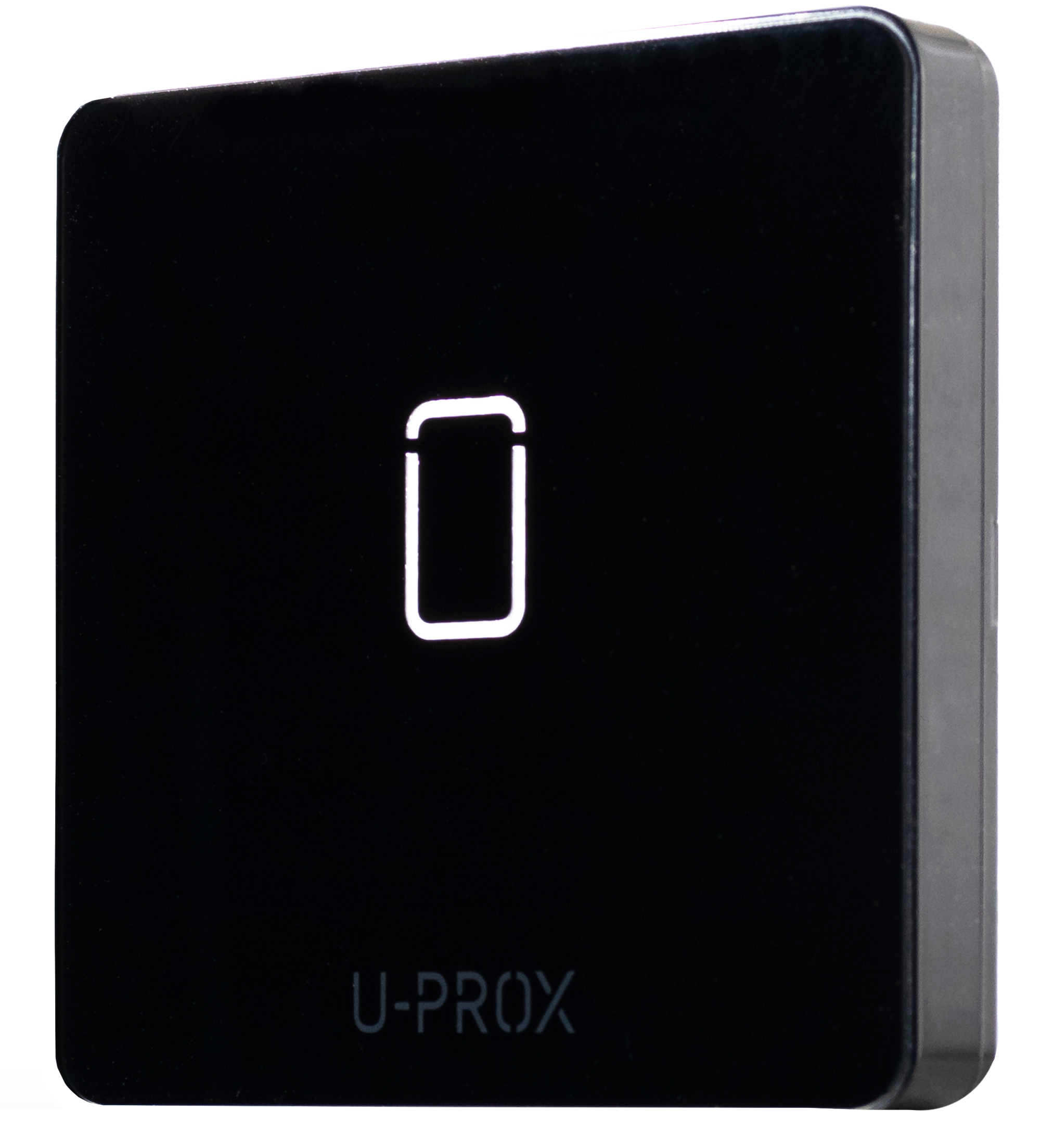
 U-PROX IP402
CLOUD-BASED ACCESS CONTROLLER
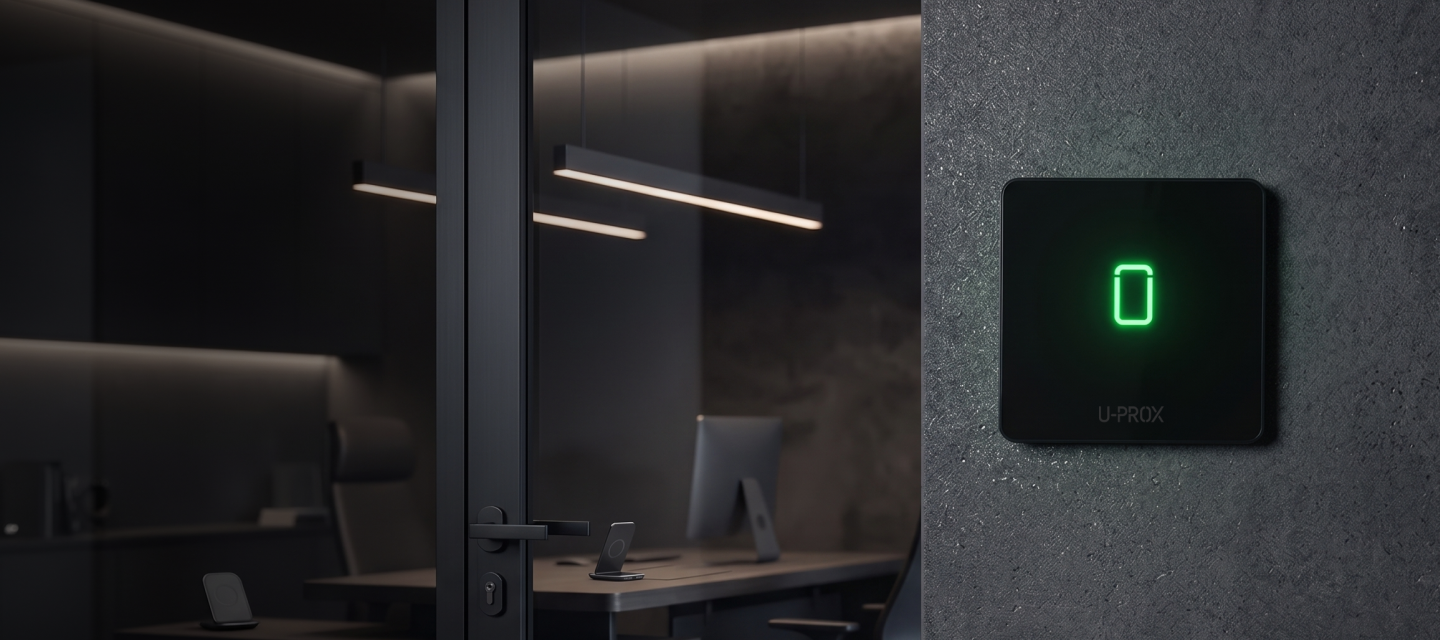
identifiers

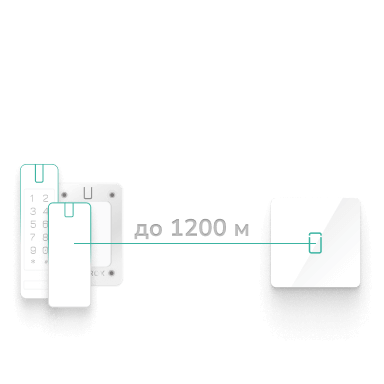
Reliable connection with automatic channel switching

Built-in contactless exit request button
events

NETWORK ACCESS CONTROLLER
A controller for setting up a one-way access point
Access control without unnecessary complications
The U-PROX IP402 is a network controller designed to set up a one-way access point. The device supports the latest U-PROX readers, connection to the ACS Cloud service and local IP/WEB software, as well as convenient configuration via a smartphone.
The IP402 helps you get your access control system up and running quickly and tailor it to the needs of a specific site — from a small office to a large-scale distributed system.


New features for convenient access management
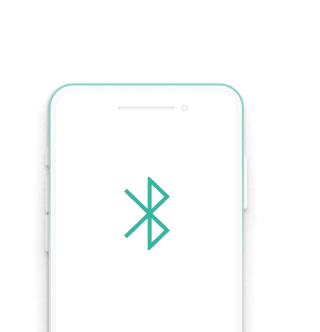
The IP402 combines network connectivity with configuration via a mobile app. The controller supports Ethernet, 2.4 GHz Wi-Fi and BLE, making it easy to connect to the site’s infrastructure and get it up and running.
Key features of the model include OSDP support, compatibility with ACS Cloud and IP/WEB, cloud-based firmware updates, and a built-in contactless exit request button.
A ready-made solution for a one-way access point
The controller is designed to manage a single one-way access point. It supports a database of up to 10,000 IDs and stores up to 47,000 events, ensuring stable system operation and the retention of access history.
Dynamic loading of identifiers and schedules simplifies administration, whilst the relay output with NO/NC inversion, the alarm output, the reed switch input and the RTE input enable the connection of the necessary access point components.


Connecting modern U-PROX readers
The IP402 supports OSDP and RS-232 interfaces for connecting readers. OSDP is used for the U-PROX SE series of readers, whilst RS-232 is used for the U-PROX SL series. The controller integrates easily into the U-PROX access control system.
OSDP support ensures modern and secure data exchange between the controller and the reader, two-way communication, device status monitoring and data encryption. The RS-232 interface provides a simple and reliable 4-wire connection for compatible equipment, supports communication over distances of up to 30 m and works exclusively with U-PROX readers, simplifying system integration and data exchange.
Cloud-based or on-premises management
The IP402 can operate with the ACS Cloud service or with the on-premises IP/WEB software. This allows you to choose the most suitable management method depending on the scale of the facility, infrastructure requirements and operational scenario.
Cloud-based management is convenient for centralised administration and distributed systems, whilst IP/WEB enables the organisation of local operation of the access control system.


Settings via smartphone
The controller can be easily configured via the U-PROX Config app using a smartphone, ensuring quick and convenient commissioning of the device. This allows you to quickly set up the IP402, connect it to the required network and carry out basic configuration without any additional equipment.
Firmware updates from the cloud help to keep the controller up to date and simplify its ongoing maintenance.
Touch-free exit
The IP402 housing features a built-in contactless exit request button with a proximity sensor. It activates at a distance of between 2 and 5 cm, so the user does not need to touch the device.
The built-in button reduces the number of individual components at the access point and makes the IP402 a ready-to-use access control solution.

Gallery
Photos and videos


TECHNICAL SPECIFICATIONS
| Output |
DC – door contact RTE – exit request button Built-in RTE touch button |
|---|---|
| Outputs (Relays) |
NO, COM – solid-state relay, 1 A @ 30 V (relay inversion mode) OUT – alarm output, VK 0.05 A @ 12 V |
| Reader |
OSDP: one reader, up to 1,000 m RS232: one U-PROX SE/SL series reader, up to 30 m |
| Connection |
Eth 100 Mbit, 802.3 100BaseT Wi-Fi 2.4 GHz, 802.11b/g/n, Open/WPA/WPA2/WEP |
| Memory |
Identifiers – 10,000 Events – 20,000 Weekly schedules – 250 Time zones – 250 Public holidays – 250 |
| Power | +10.8...+15 V (DC), current consumption < 120 mA @ 12 V |
| Dimensions | 84.3 × 84.3 × 14.5 mm |
| Weight | 0.18 kg |
| Case colour | black |
| Case material | пластик ABS+PC та скло Gorilla Glass |
| Ambient | from −10°C to +55°C |
| Configuration | via the U-PROX Config mobile app using Bluetooth |
| Complete set |
1. U-PROX IP402 2. Installation kit 3. Quick start guide |
U-PROX IP402 User manual
Due to the ongoing development of the system, its hardware, and its software, be sure to update the device’s firmware before using it.
Description
U-PROX IP402 is a cloud-based control panel designed for use in access control systems (ACS) ofvarious scales — from small office facilities to large enterprises. The device provides access control for residential and industrial premises and supports event logging and time-and-attendancetracking.
The control panel is supplied in an enclosure with a built-in contactless “Request to Exit” button and without a power supply unit.
U-PROX IP402 operates with readers connected:
- via the RS-232 interface (U-PROX readers only);
- via the RS-485 interface using the OSDP protocol (U-PROX SE series readers or third-partyreaders supporting OSDP 2.2).
The control panel processes data received from the reader and controls actuators, such as electric locks orsirens, using two outputs.
The device is equipped with two fixed-function inputs: one for connecting a door status sensor andone for the request-to-exit button.
The control panel can operate in standalone mode or as part of a networked access control system. Devices are interconnected via the Ethernet interface (wired computer network) and/or via the Wi-Fi interface (wireless computer network).
Network configuration is performed via Bluetooth Low Energy (BLE) using the U-PROX Configmobile application.
Control panel’s firmware updates are performed remotely via Wi-Fi or via Ethernet.
The device is powered by 12 V DC.
U-PROX IP402 is designed to control a single door, equipped with one reader and a request-to-exitbutton. A large non-volatile memory capacity allows the control panel to manage access for up to 10,000 identifiers.
Carefully engineered technical and mechanical design, Wi-Fi and Ethernet connectivity, non-volatile memory, a real-time clock, and protection of reader ports against short circuits, overvoltage, and reverse polaritymake U-PROX IP402 a versatile solution for building modern access control systems.
Technical Specifications
Power supply: external 12V source; current consumption (with no load) — no more than 120 mA; ripple amplitude — no more than 500 mV.
Reader connection:
- RS232 – up to 10 m (contactless U-PROX identifiers)
- RS485 (OSDP2.2) – up to 1000 m
Built-in touch button: request for exit function.
Inputs: door contact (DC) and request to exit button (RTE).
Tamper contact: for enclosure opening detection.
Outputs: one solid state relay (NO/NC, COM) — 1 A @ 30 V; alarm output (open collector) — 12V @ 0.05 mA.
Wireless interface: Wi-Fi 2.4 GHz, 802.11b/g/n, supports Open/WPA/WPA2/WEP.
Cloud ACS operation: U-PROX ACS Cloud.
Local ACS operation: U-PROX WEB.
Configuration: full configuration is performed via ACS software through a computer network.
Real-time clock.
Non-volatile memory:
- Identifiers — 10,000
- Events — 20,000
- Time zones — 250
- Weekly schedules — 250
- Holidays — 250
- Temporary identifiers — 1,000
Terms
Identifiers: In access control systems, each user has a unique code. It can be plastic cards, key fobs, etc.
Reader: Devices that read codes and connect to the ACS control panel. The Wiegand RS232 or OSDP interfaces are used.
PIN code: A code entered with the reader keypad; may function independently or as an addition to a card or key fob.
Door: An access control point (e.g., door, turnstile). Access point — a logical unit of the system.
Access point: See “Door.”
Passage point: A logical ACS unit that controls passage through a door in one direction; includes a reader, control panel (or its part), and actuator. A single-point door is one-way; two-point — two-way.
Exit request button: Used to exit a room.
Door contact: An input for connecting magnetic, rotary, or other sensors to monitor door state.
“Passage time” interval: The time after a user passes during which the door is not monitored even if the contact is triggered.
Identifier attempt detection: If several unregistered identifiers are presented consecutively, the control panel switches to alarm mode.
Schedules: Time intervals and schedules that define access rights. The control panel can store up to 250 time intervals, 250 weekly schedules, and 250 holidays.
Time zones: Time intervals used for organizing access schedules.
Download: The process of transferring configuration data from a computer to the control panel after programming.
Description and Operation
Control panel Structure
The device is shown in Fig. 1.
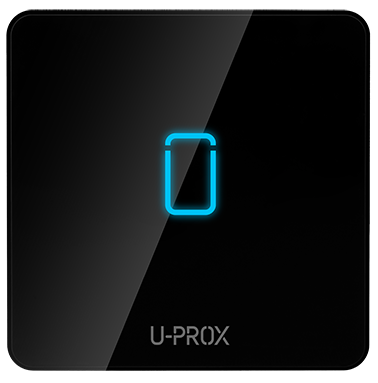
Fig. 1. Appearance of the U-PROX IP402
The control panel consists of the following components:
- Upper part of the device case
- Request to exit touch button
- Bottom part of the case
- Mounting screw
- Device board with terminal blocks
Terminal Block Layout
The layout of the connectors on the bottom board of the device is shown in Fig. 2.
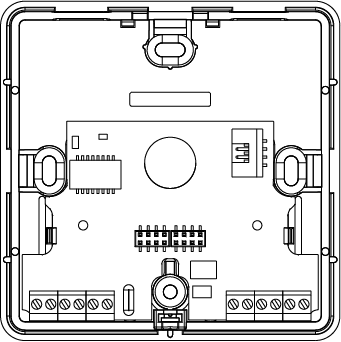
Control panel Terminal Functions
| Terminal | Label | Description |
|---|---|---|
| GND | – | External power supply connection V- |
| +12V | – | External power supply connection V- |
| NO/NC |
Normal open/Normal closed
|
Relay contacts |
| COM | Common |
Relay contacts
|
| RED | +12V |
Reader
V+
|
| BLK | GND |
Reader
V-
|
| GRN | Data 0 |
Reader Data 0
|
| WHT | Data 1 |
Reader Data 1
|
| GND |
Ground
|
Ground |
| DC | Door contact | – |
| RTE | Exit request button | – |
| OUT | Alarm output | – |
| Eth | Ethernet cable connector |
Control panel Indication
Access mode indication is performed by the reader connected to the control panel. Default settings are as follows:
- Standby mode: no sound, red flashing once per second
- Night mode or Lock: no sound, red-yellow flashing once per second
- Alarm: no sound, solid red
- Card registration: no sound, green flashing once per second
- Initialization: no sound, no light indication
- Data read/upload, firmware update: no sound, solid red
- Access granted: short beep, steady green; 5 seconds before door timeout — short beep once per second
- Access denied: continuous sound, solid red
The touch button LED indicates button pressing only!
Control panel Operation
Control panels are supplied in an unloaded (factory) state, in which the red LED flashes once per second.
To operate, the control panel must be configured using setup software on a mobile device. After the configuration is uploaded and all connections are correct, the control panel switches to “Standby” mode.
The control panel can manage one passage point that operates in four modes: “Standby”, “Alarm”, “Block”, and “Free Passage”. The “Free Passage” mode has the highest priority (e.g., firealarm), followed by “Block”, “Alarm”, and “Standby”.
Installation
The device should be installed so that it is convenient for all users to press the exit request button.
1. To connect the cable under the device housing, you must prepare a recess or hole. For wiring, you can use a junction box or a 80-mm-diameter surface-mount box.
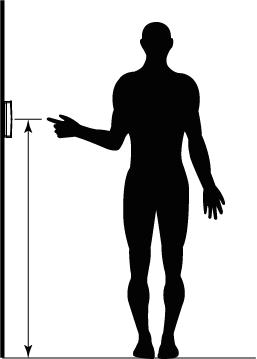
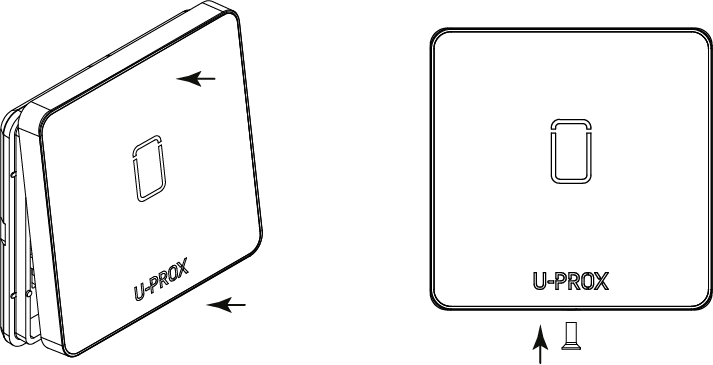
2. Remove the screw at the bottom of the device.
3. Remove the top cover with the main board.
4. Mount the back plate of control panel on the wall using supplied plastic dowels and screws.
5. Carry out wiring to the control panel.
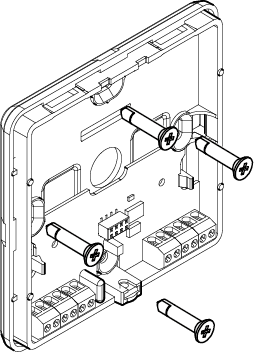
6. Connect the reader to the control panel
7. Connect the Ethernet cable to the port and the wires to the corresponding contacts
9. Place the top cover and tighten it with a screw.
Connection
Wiring diagram:
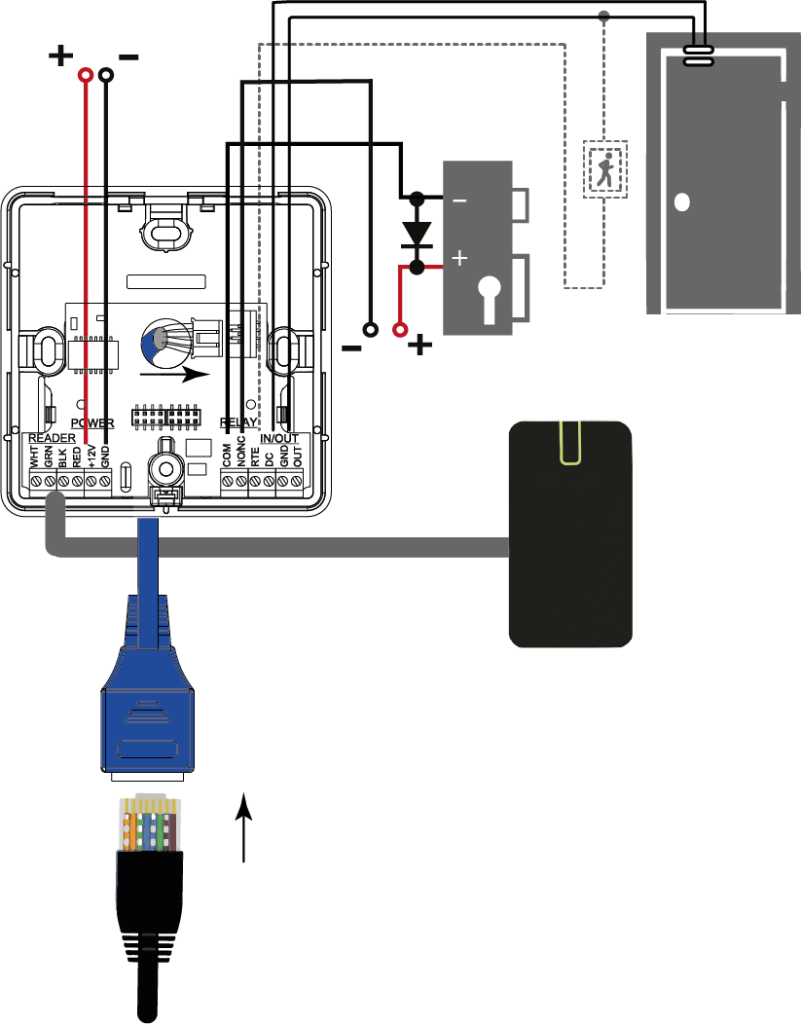
Reades connection
The control panel works with readers connected via the RS232 interface (U-PROX readers only) or via the RS485 interface and the OSDP protocol (U-PROX SE series readers or readers from other manufacturers with OSDP 2.2 support).
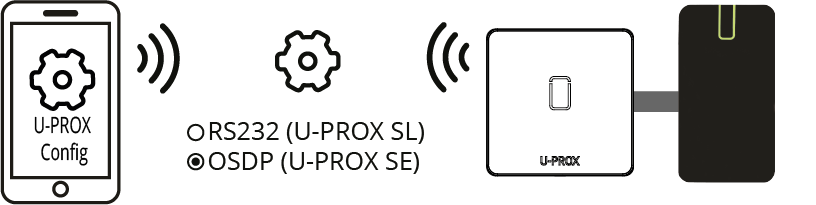
The reader’s connection interface is configured using the U-PROX Config mobile app.
We recommend to use multi-core signal cable with 0.22 mm2 cross-section of each wire between reader and panel.
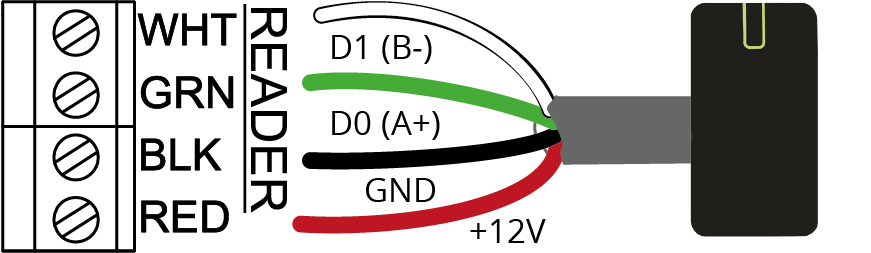
The reader connection wires functions are listed in the table.
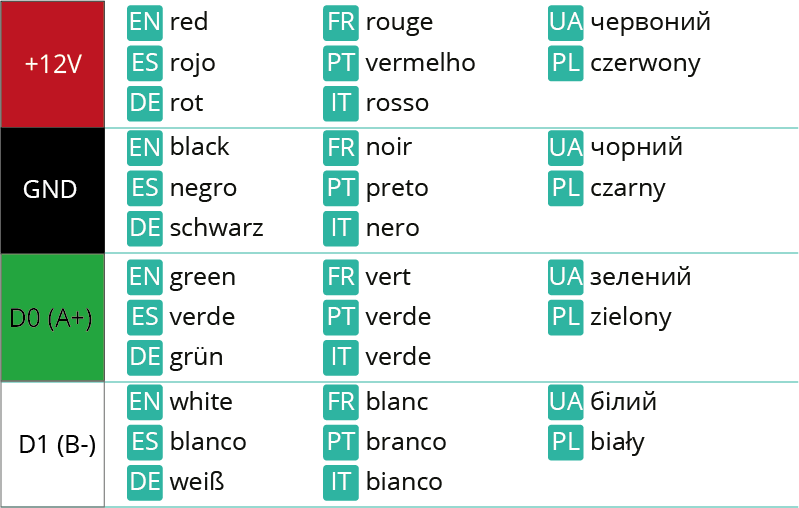
We recommended to use following whiring when reader connected to the control panel with twisted pair.

Door contact connection
The control panel uses a door contact to determine the door’s status (open/closed). If there is no door contact, the control panel will not be able to detect unauthorized access or situations when the door is held open for too long (such as when several people pass through using a single pass).
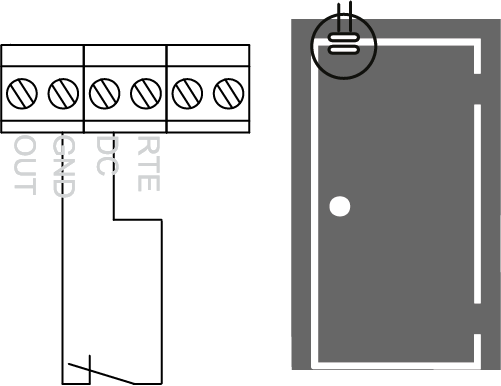
When using the device without a door contact, you must install a jumper between the DC and GND contacts.
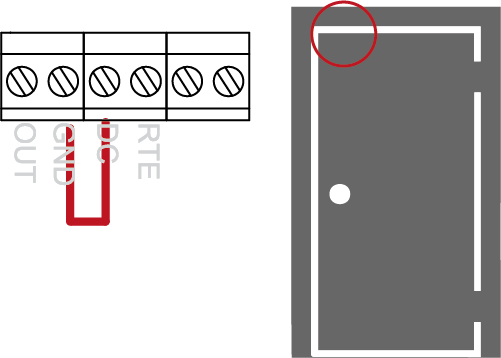
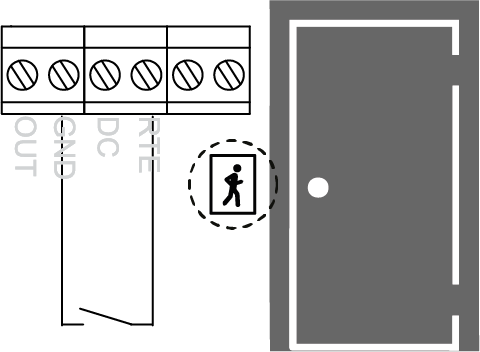
Request to exit button (RTE, REX) connection
The door opens when the exit request button is pressed and released. In addition, the exit request button can be used to open the door remotely. For example, to allow a secretary or security guard to open the door manually.
When installing the device, you can use either the built-in button or a wired button connected to the RTE and GND terminals.
Lock connection
The control panel has one solid-state relay for controlling actuators. Using this relay, the device can control an electric lock or an latch.
By default, the device’s relay is programmed to operate with normally open (NO) contacts for actuators controlled by applying voltage to open them; these are typically electric latch.
The relay’s operating mode can be programmed to enable inversion mode; in this case, the relay will operate with normally closed contacts with devices controlled by de-energization (NC) to open, which are typically electromagnetic locks.
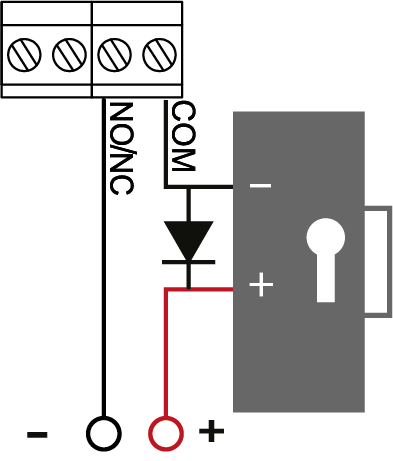
When using relay to turn on / off current via inductive load, eg. to run electromagnetic lock, there are electric pulses of high amplitude. To prevent damage of relay contacts, shunt inductive load by diode, set in opposite direction to voltage of coil supply.
Control panel Programming
Connect to the control panel using U-PROX Config software via Bluetooth Low Energy (BLE). Supported devices: Android 5.0+ and iOS 8.0+ with Bluetooth 4.0+ (BLE).
- Launch U-PROX Config:
Launch U-PROX Config on your mobile device. If Bluetooth is disabled, enable it (for Android 6.0 and higher — enable location services). Tap “Search” to detect nearby devices.

- Connect to the control panel:
Select the U-PROX IP402 control panel from the list and press “Connect.”
- Enter the engineering code:
After selecting the device, you’ll be prompted to enter an engineering code. Enter the default code (1234) or another code provided by the manufacturer.
- Configure network parameters:
Using U-PROX Config, configure Wi-Fi, DNS, IP address (or enable DHCP), and the port used to connect to the ACS server or cloud system.
Default code — 1234
- Add the control panel to access control system (ACS) according the ACS manual
- Register identifiers and create users:
Using the access control system (ACS), add identifiers (contactless cards, PIN codes, mobile identifiers) and assign appropriate access rights and schedules.
- Upload configuration:
After completing all settings upload the configuration to the control panel. The device will switch to standby mode.

Control panel Firmware Update
Connect to Wi-Fi or Ethernet the “Firmware Update” with Internet access. Connect to the device using U-PROX Config and select the “UPDATE” option from the menu. Tap this option, choose the update type (from the default server or via a custom link), and the firmware will download in the background. The control panel will update automatically (the process takes approximately 5 minutes).
Maintenance
Factory Reset
- Disconnect power from the control panel
- Remove the upper cover of the control panel
- Short the OUT and DC contacts
- Place the upper cover back
- Apply power and wait until the beep ends (about 40 seconds)
- Power off the control panel, remove the cover, and remove the OUT and DC contacts
Factory Settings
- Communicator Wi-Fi: not configured,
- Communicator Ethernet: DHCP enabled
- ACS server address: ACS cloud – acs-panels.u-prox.systems
- Inputs (loops): DC — door contact; RTE — exit request button
- Outputs: Relay — lock mode (inversion disabled), OUT — “Alarm”
- Reader: OSDP
Warranty
The manufacturer guarantees that the U-PROX IP402 control panel complies with the parameters described in this manual when properly stored and operated.
- Storage warranty period — 6 months from the date of manufacture
- Operational warranty period — 24 months from the date of commissioning
- Delivery, personnel training, installation, commissioning, and warranty service are carried out by the manufacturer or authorized organizations
- In case of a defect caused by the manufacturer, correction is performed within 10 days
- Warranty service is not provided in cases of:
- Incorrect connection,
- Failure to follow this manual,
- Mechanical damage,
- Natural disasters.
- The manufacturer reserves the right to make design modifications that do not affect key specifications or reliability.
Training and Technical Support
Training courses covering installation and usage of the U-PROX IP402 control panel are conducted by “Limited Liability Company Integrated Technical Vision.” For additional information, please contact the company’s staff at the phone numbers listed below.
Technical support:
+38 (091) 481 01 69
support@u-prox.systems
https://t.me/u_prox_support_bot
This support is intended for trained specialists. End users should contact their dealers or installers before reaching out to “Limited Liability Company Integrated Technical Vision.”
Technical information is available at: www.u-prox.systems
Certification
“Limited Liability Company Integrated Technical Vision” declares that U-PROX IP402 complies with the Electromagnetic Compatibility Directive 2014/30/EU and Directive 2011/65/EU (RoHS). The original Declaration of Conformity is available at www.u-prox.systems in the “Certificates” section.
Uploads
FAQ
-
You can buy U-Prox equipment from our partners.
-
Everything that is U-PROX, from the idea to the engineering implementation is done exclusively in Ukraine.
-
Yes, if the security system uses the U-PROX PIR Cam detector with photo fixation.
Thanks to it, users of the U-PROX Home mobile application can receive a photo from the detector at any time by pressing one button.
Also, when a photo is received on request, it is possible to save it to the user’s smartphone photo gallery and enlarge it if necessary.
The owner of the security system can also configure permissions to send photos in case of an alarm to security companies.
-
You can prevent water leaks in your apartment or house thanks to automation devices from U-PROX. The flood prevention system warns you of an unwanted water leak in the U-PROX Home app and automatically shuts off the water supply in case of a pipe burst or a malfunction of the washing machine.
The smart valve control and power supply device allows you to automatically shut off/open the water supply when arming/disarming the room.
You can also create personalized schedules for arming/disarming/operating the relay/water valve.
-
It is reliable communication that distinguishes the U-PROX security system from its competitors. We use DSTU GOST28147-89 encryption with reverse gamma, 256-bit key (3DES level).
Any of our radio devices operates in the notification (notification) mode, not polling, that is, as soon as an event occurs, it is immediately transmitted to U-PROX. In turn, the security center confirms the reception of the data packet by sending a response. The communication is two-way, imitation-resistant: the packet contains the detector serial number and the packet sequence number, which makes it impossible to replace the detector or send the same data packet by an intruder.The detector periodically sends data about its status to U-PROX, notifying that it is “alive”. We call this a “heartbeat”. In response, it receives confirmation and additional commands.
If the detector is installed in a place with poor conditions, it is used:
- increasing the radio communication power – 3 gradations of the transmitting device power are available,
- switching the data rate to improve the sensitivity of the receiving path,
- switching to other (backup) channels in the frequency range of 868.0 … 868.6 MHz.
In turn, the basic U-PROX device has 2 transceivers that work simultaneously to receive signals on different channels and speeds. And of course, there is a definition of radio jamming.
-
- We believe that this is our future – in 2-3 years, wireless equipment will occupy a large part of the security systems market. Almost everything will be wireless, and prices for such solutions will decrease.
- Wireless solutions are fast, convenient, and reliable.
- Will not spoil the interior design and renovation during installation, as it requires minimal installation work.
- Minimize the time spent on installing the security system.
- U-PROX WDC, U-PROX Wireport, U-PROX Multiplexer and U-PROX Siren have wired inputs to which wired devices can also be connected.
-
The sensors are powered by their own batteries.
And the U-PROX security center is equipped with a lithium-ion battery, which will provide autonomous power for 24 hours.
And if this is not enough, then you can use the design feature of U-PROX devices – an input power supply of 12V DC, which means that an external uninterruptible power supply can be used, or a car battery, then the autonomous life can be increased, even up to several weeks.
-
Your device communicates with the security company via two GPRS/LTE channels and the Internet – Wi-Fi or Ethernet.
If you try to “jam” or somehow block the communication channel, U-PROX will send a signal informing you.
-
If the animal is no more than 25 kg, then we will install special sensors that do not react to such animals, it is not required to restrict pets in movement.
If the animal is large, then we recommend allocating a space for it in the room, where sensors that react to movement will not be installed. There, you can install a sensor that responds to glass breakage, or sensors for opening doors and windows. -
Most of the sensors are powered by lithium batteries. They have sufficient capacity and operating temperature range.
Thanks to the adaptive power of the radio transmitters and the optimized data transmission protocol, the service life can be up to 7 years. The shortest service life of alkaline batteries “finger” or AAA, which are installed in the keyboard – up to 2 years.
But the replacement does not even require a screwdriver, the keyboard is removed using a regular plastic discount or bank card.
-
Modern systems work via an Internet connection, this is mobile Internet in LTE networks or fixed cable.
U-PROX uses both connections, thus providing data transmission redundancy to the monitoring station in case of blocking or jamming of GSM-communication or cable breakage.
Control of communication with the device is provided by the monitoring panel.
-
We use a proprietary technology called “U-PROX BAND”, it operates in the 868.0-868.6 MHz frequency range allocated for such systems and transmitter powers allowed without licensing up to 25 MW in the basic device, up to 20 mW in detectors, 10 mW in key fobs, with dynamic adjustment (the first exchange attempt is always at minimum power).
U-PROX BAND has significant advantages over its competitors: the length of the packets transmitted over the air is almost two times less, the optimized retry algorithm (energy consumption-wise), the sensitivity of the detector receivers is higher (this is the range both in line of sight and in building conditions). The U-PROX security center has two transceivers operating at different frequencies in the permitted range, providing redundant data transmission from sensors.
One of the “tricks” of U-PROX BAND is the function of updating the software of all elements over the air. If any shortcomings are corrected or the functionality of the device is added, then the owner and the security company do not need to worry about dismantling, sending for an update. The update will occur automatically after the automatic update of the basic device.
-
The security group is a logically independent unit in the security system.
It combines a group of sensors, which is placed and removed from protection separately and independently of others.
This can be done by a user who is authorized to manage a specific group.
-
This is a function that can work in any of the security groups.
It is implemented as follows. Consider the example of the house. When people put guards in this mode, the sensors that protect the perimeter: doors, windows, or even the entire first floor – become active. Other sensors – indoors – inactive. So, you can move freely inside the room, and intrusion from the outside will be detected.
-
You can install the U-PROX Security System even if you have no wired internet.
Since the backup communication source is the LTE/GSM network (the mobile operator card is installed).
But in this case, you lose one of the communication channels.
-
Wi-Fi is a wireless technology for connecting devices to the wired Internet.
It is implemented in all security centers (hubs).
The central unit in this case can be placed anywhere.
-
This is implemented using cloud technology.
With the security panel, the system works directly, “without intermediaries”.
With the user’s smartphone, the mediator is the cell of the device in the cloud, through which events are displayed on the smartphone and control commands from the user are passed.
-
If the phone is out of network, the security system remote control and watch events will not work.
But you can get an alarm notification if you set up a call from the device to the user’s phone. This mode is indispensable if the system operates autonomously, without remote monitoring.
We advise you to entrust security only to specialized companies, which will monitor your facility 24/7 and respond in case of alarm notification.
U-PROX is the best wireless device for remote protection.
-
Everything that is in U-PROX, from the idea to the engineering implementation is done exclusively in Ukraine.
-
- Modern energy-saving technologies allow you not to think about replacing batteries for several years (2-7 years).
- 2 weeks before the full discharge, the security system will warn you and the service security organization about the discharge.
- Popular battery sizes are used ААА, CR2, CR123A і CR2032.
-
The U-PROX security system has a refined design.
As standard, the cases of devices are executed either white or black.
For WDC sensors, the white starter kit includes replaceable dark brown housings.
-
The use of mobile applications U-PROX Home and U-PROX Installer allowed to separate system settings and management.
The U-PROX Home application is used to control the U-PROX security system. The application implements the required set of functions:
- Arming.
- Disarming.
- Arming in night mode.
- Alarm button.
- Event history with simple filters.
- View temperature from sensors.
- Add camcorders with zones.
- Watch the video from a connected camera.
- In the event of any failure in the system application, U-PROX brings this information to the home screen, and notify the user via Push message.
U-PROX Installer is used to configure the security system. Through an application is performed the primary activation of the sensors
-
PACS — Physical Access Control System —an access control and management system is a set of hardware and software control and management tools.
The main goal is to restrict and register the entry-exit of objects in a given area through “points of passage”: doors, gates, etc.
The main task is to control access to a given territory (who to let in, at what time and to what territory), including also:
- restricting access to a given territory;
- identification of a person who has access to a given territory.
-
Areas of application have a wide range of ACS:
- company offices, business centers;
- banks;
- educational institutions (schools, technical schools, universities);
- industrial enterprises;
- protected areas;
- parking lots;
- places of passage of vehicles;
- private houses;
- residential complexes;
- cottages;
- hotels;
- public institutions (sports complexes, museums, metro, etc.)
-
An identifier is the basic element of an access control system that stores a code.
Each client is assigned a specific key (code), which serves to determine the owner’s rights – identification.
A card, a key fob, a tag can perform the function of an identifier.
-
The control panes is the “brain” of the system, which determines whether or not the owner of the identifier is allowed to enter the door.
It has a built-in memory that stores identifier codes with a list of access rights for each of them.
When a person presents (brings to the reader) an identifier, the code read from it is compared with the one stored in the database, on the basis of which a decision is made to open the door.
-
A reader is a device that reads the code (key) of the identifier and transmits it to the controller.
-
Open formats JSON and SOAP (XML) allow interaction between different applications, exchange data with access control systems and create applications that complement and extend the standard functionality of the U-PROX Web system.
API capabilities:
- Secure data exchange over a computer network.
- WEB service – the opportunity to interact with any platform and programming environment for SOAP and JSON protocols.
- Implementation of the user interface using the API.
- The ability to integrate with other systems and applications implemented by third-party developers.
-
U-PROX WEB provides a full range of solutions for quick installation, configuration and daily use of IP ACS by enterprises of any size, from a small office to a large company with many branches.
U-PROX Web has a full-featured web interface with fine-tuning of all ACS capabilities and provides the ability to monitor events, configure equipment, manage personnel access, and generate reports.
-
You can buy U-Prox equipment from our partners.
-
- Connect wires D0 (green) and D1 (white) with each other
- Apply power to the reader
- Connect to the reader with application U-Prox Config installed on smartphone.
- Select “Settings”
- Set a password
- Go back
- Press “Save Settings”
- Press “Disconnect”
-
15 years ago massively used wired phones, mobile phones were either business or luxury. Now almost everyone has a mobile phone. It’s not only comfortable. The quality of wireless communication is steadily increasing.
The same situation with security systems. Wired systems require high-quality cable, trained personnel with electrical education, quality installation with line inspection, construction work with drilling, wiring, and other inconveniences. All this requires a lot of time.
As a result, we have a total cost that includes work. And compared with wireless systems, it is much higher. The wireless security system can be installed independently, the kit includes everything you need for installation.
The U-PROX security system has U-PROX BAND radio communication technology. It has unsurpassed characteristics in range, resistance to interference, due to channel redundancy, and is very efficient in terms of energy consumption.
-
It is very easy to install the U-PROX security system. Everything you need for installation: screws, fasteners, come complete with each sensor. The devices have simple mounts. Installation of the sensors to the required space can be done using screws or using two-way tape.
The overall security system installation will take about 10-15 minutes.It is very easy to install the U-PROX security system.
Everything you need for installation: screws, fasteners, come complete with each sensor. The devices have simple mounts.
Installation of the sensors to the required space can be done using screws or using two-way tape.
The overall security system installation will take about 10-15 minutes.