Україна
 U-PROX SE QR slim
A universal reader for cards, mobile identifiers and QR codes


One reader for a variety of scenarios
A card, a smartphone or a QR code — there’s a convenient way for every type of user to identify themselves
Several authentication methods in a single device
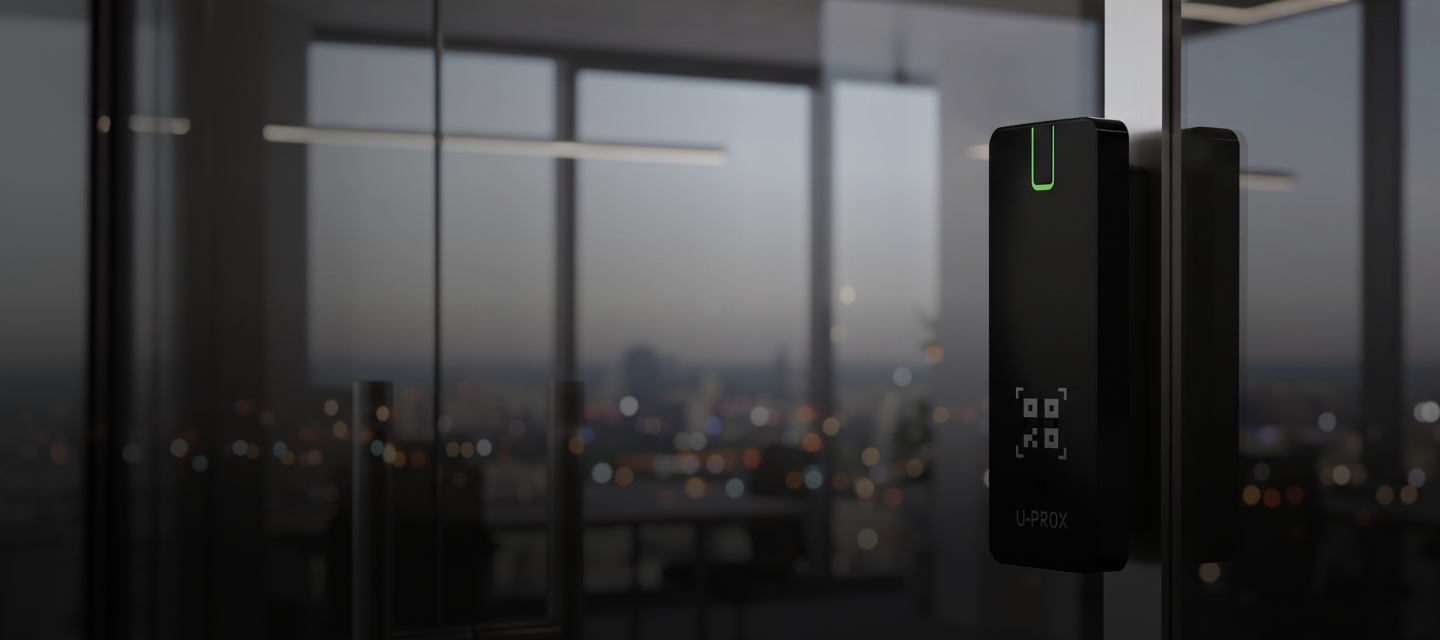
The U-PROX multi-format reader supports QR codes, mobile identifiers and contactless cards. It is a versatile solution for venues where fast, convenient and contactless user identification is essential.
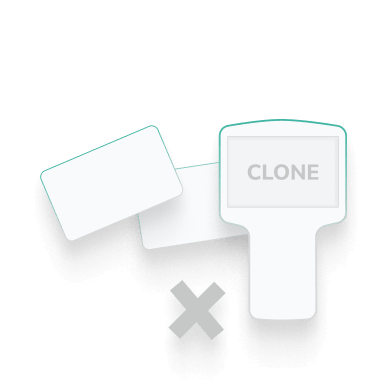
The reader supports multiple access methods within a single system: QR codes, Mifare cards, U-PROX ID digital cards, mobile identifiers via BLE and NFC, as well as Tag / Auto Tag.


Support for popular card formats
The reader supports Mifare® Classic, Mifare® Plus, Mifare® DESFire (EV1/EV2/EV3), Mifare® Ultralight, ISO 14443A cards (13.56 MHz), PayPass, PayWave, as well as U-PROX ID, U-PROX Tag and Auto Tag mobile tags (2.4 GHz). This broad compatibility ensures flexibility when integrating the device into various access control systems.
The reading range for RFID cards is up to 4 cm. Thanks to support for multiple technologies, a single device can be used in access control systems with various types of cards, key fobs and mobile identifiers.
QR codes as a new way to access
The scanner’s main new feature is its support for QR codes. The device scans them from a smartphone screen at a distance of 5–15 cm.
The built-in proximity sensor automatically activates the display and backlight, ensuring quick and convenient use.
QR codes make it easier to organise temporary access for visitors and contractors without issuing physical cards or key fobs.


Flexible integration with access control systems
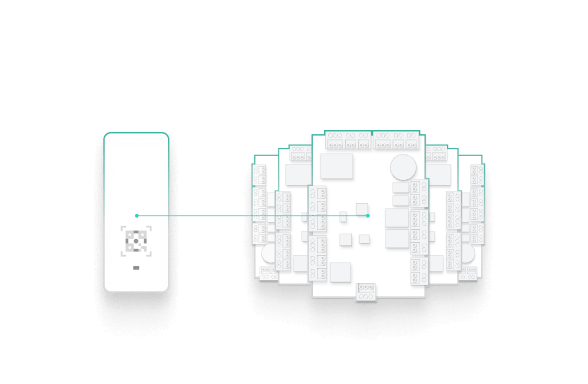
The reader connects to access control systems via Wiegand, TouchMemory, RS-232 and OSDP 2.2 interfaces. Thanks to its support for widely used interfaces, the device can be easily integrated into various access control systems.
The reader is compatible with controllers that support one of the specified connection interfaces. This allows it to be adapted to both new and existing site infrastructure.
Working with mobile identifiers
The reader supports mobile identifiers via BLE and NFC, allowing a smartphone to be used as a means of access instead of a physical card.
The reading range for BLE identifiers is up to 15 m. Support for Tag / Auto Tag expands the possibilities for using mobile identifiers and allows the identification scenario to be adapted to the requirements of a specific facility.


Working with encrypted cards
Support for encrypted Mifare® Classic, Mifare® Plus and Mifare® DESFire cards provides an enhanced level of data protection in access control systems. The reader supports these card types, utilising their authentication and data protection mechanisms.
Mifare® Classic is used in many existing access control systems and supports basic encryption mechanisms. Mifare® Plus provides a higher level of security and allows for the gradual modernisation of infrastructure without the need to completely replace the existing card stock. Mifare® DESFire utilises modern cryptographic algorithms and multi-level data protection, making it the optimal solution for facilities with heightened security requirements.
Gallery
Photos and videos


Want to buy?
Contact partner companies to purchase or install security and automation devices.
Want to sell?
Become an official distributor, reseller or installer of U-PROX security and safety systems.
TECHNICAL SPECIFICATIONS
| Generation | The second generation of U-PROX SmartLine series readers |
|---|---|
| Mifare®, 13.56 MHz |
ISO14443A, 4/7,/10 байтів Mifare®Classic 1K/4K Mifare®Standard Mifare®Ultralight Mifare®Hi-Memory Mifare® Plus S 2K Mifare® Plus S 4K Mifare® Plus SE 1K Mifare® Plus X 2K Mifare®Plus X 4K Mifare®Plus EV1 2K Mifare® Plus EV1 4K Mifare® DESfire Mifare® DESfire EV1 Mifare® DESfire EV2 Mifare® DESfire EV3 |
| NFC, 13.56 MHz | ISO 14443 / 15693 U-PROX ID (Android only) |
| Payment cards |
PayPass PayWave |
| 2.4 GHz mobile ID |
U-PROX ID U-PROX Tag U-PROX Auto Tag |
| QR codes | 2D QR codes |
| Read range |
NFC / Mifare: up to 5 cm 2.4 GHz ISM: adjustable, from 10 cm to 15 m QR code: depends on size (2×2 cm recommended) — from 5 to 15 cm |
| Interfaces |
Wiegand Auto Wiegand 26 / 32 / 34 / 37 / 40 / 42 / 56 / 58 / 64 / 80 біт RS-232 TouchMemory OSDP v2.2 |
| Power | +9...+15 V (DC), current consumption < 80 mA |
| Connection |
8-core coloured cable Wiegand – up to 150 m, TouchMemory – up to 30 m, OSDP – up to 1000 m |
| Radio frequency |
RFID HF — 13.56 MHz (ISO/IEC 14443 Type A) ISM band — 2.400…2.4835 GHz |
| Dimensions | 47.5 x 123.4 x 13.3 mm |
| Weight | 130 gram |
| Case colour | black |
| Case material | plastic ABS+PC, glass Gorilla Glass |
| Ambient | IP65 Temperature range: −20 °C … +60 °C |
| Configuration | Via the U-PROX Config mobile app using BLE |
| Complete set |
1. U-PROX SE slim; 2. Installation kit; 3. Quick start guide |


U-PROX SE QR Slim User manual
Description
The U-PROX SE QR Slim – universal SE series reader is designed for use in modern access control systems. The device is intended for reading QR-codes, mobile and contactless identifiers. Configuration and basic setup are performed via the U-PROX Config mobile application.
The reader, with the U-PROX ID application and U-PROX ID mobile identifiers, enables any accesscontrol system to use smartphones as identifiers.
U-PROX SE QR Slim supports reading 2D QR codes, MIFARE 13.56 MHz cards as well as PayPass and payWave payment cards — with a reading range up to 5 cm.
For mobile identifiers, a 2.4 GHz radio channel is used, with an adjustable reading range from 10 cm to 15 m, allowing the device to be used not only for doors, but also for turnstiles, access gates, and barriers.
The U-PROX SE QR Slim enclosure is made of ABS+PC plastic and has a Gorilla Glass front surface. It has a built-in camera for scanning QR codes, a QR code spotlight, and proximity and light sensors. The reader has an IP65 protection rating and is designed to operate within a wide temperature range.
Thanks to its compact dimensions and minimalist design, the reader is suitable for both indoor and outdoor installation.
Attention!!! The reader DOES NOT SUPPORT 125 kHz RFID cards (ASK/FSK)!
Installation
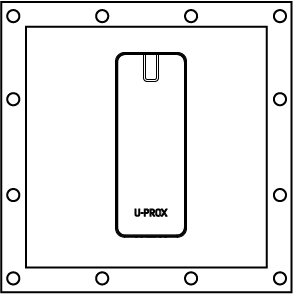
1. Make small recess or hole (diameter is 14 mm) to connect cable under the reader’s case

2. Remove the screw at the bottom of the reader
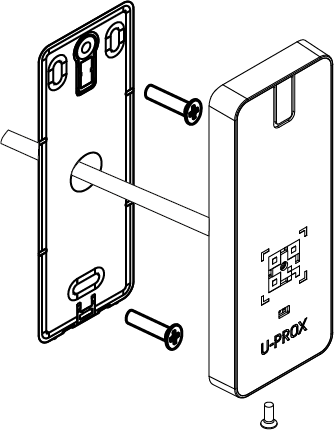
3. Remove the top cover, remove the back plate
4. Mount the back plate of reader on the wall using supplied plastic dowels and screws
5. Carry out wiring to the control panel
6. Insert the reader in the back plate
7. Place the top cover and tighten it with a screw
Installation on the metal surfaces may cause decrease of reading range.
Connection
Seamless and easy connection to existing and new access systems, due to the OSDP, Wiegand 26, 32, 34, 37, 40, 42, 56, 58, 64, 80 bits interfaces, Wiegand with automatic selection, RS232 and TouchMemory supports.
We recommend to use multi-core signal cable with 0.22 mm2 cross-section of each wire between reader and panel.

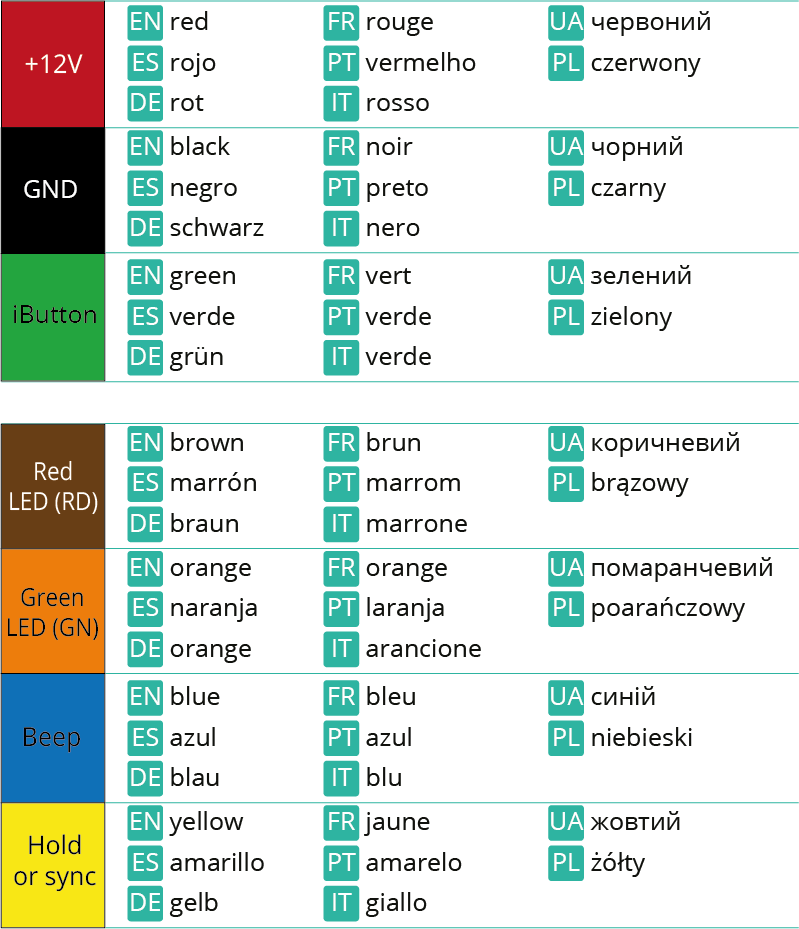
Do not place readers closer than 20 cm one from another. It is possible to install two readers at a distance 10-15 cm of each other when their yellow wires (Hold/Sync) interconnected. This synchronizes the work of the readers, they will work alternately.
Wiegand
The reader connection wires functions are listed in the table.
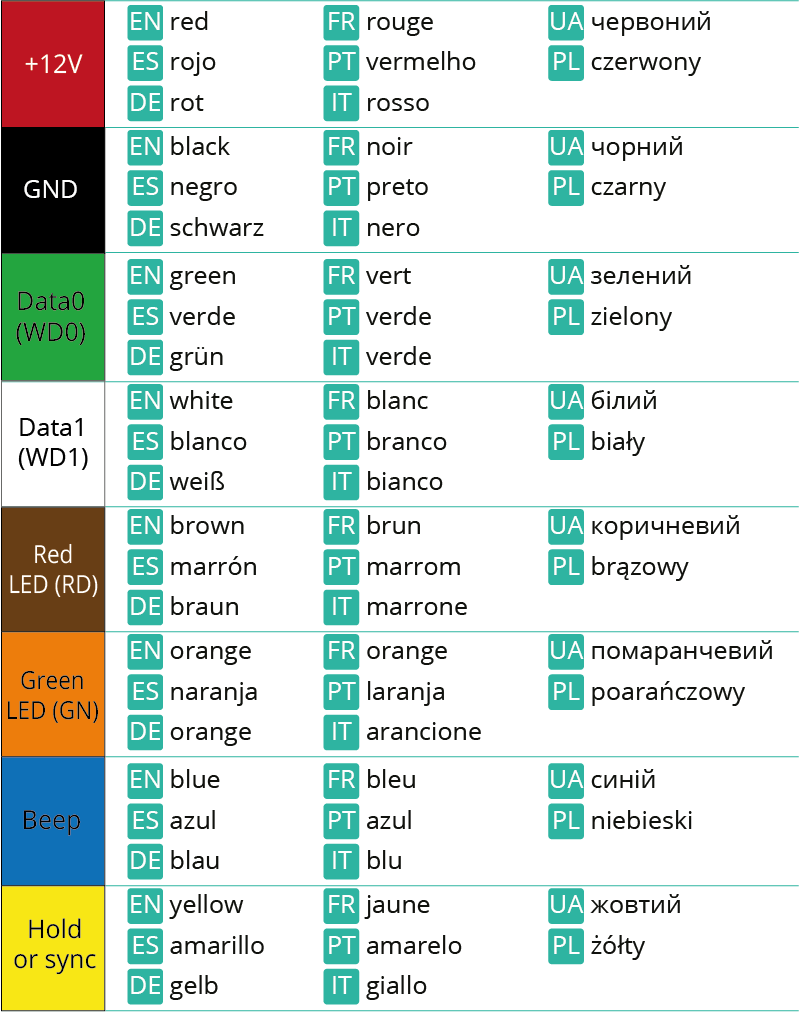
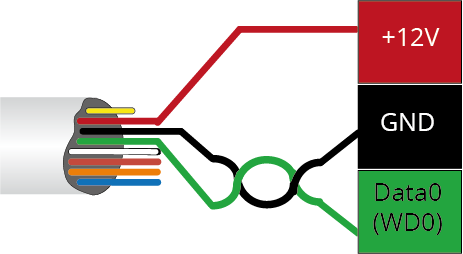
We recommended to use following whiring when reader connected to the control panel with twisted pair.

OSDP
The reader connection wires functions are listed in the table.
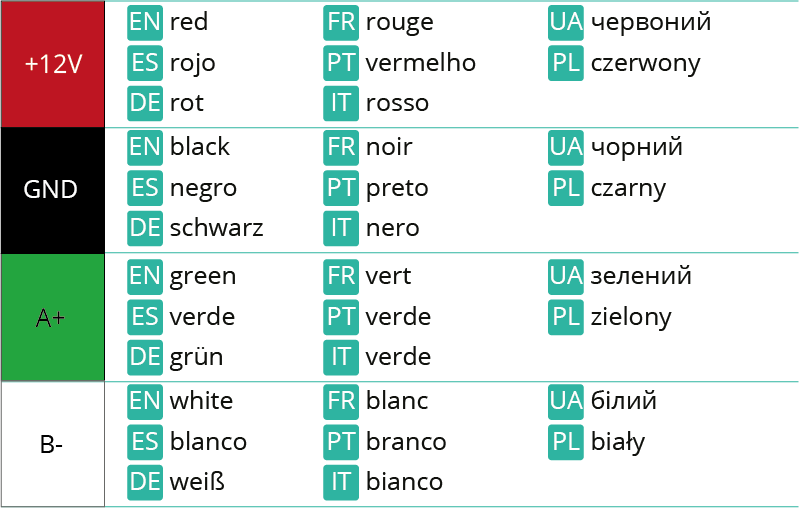
We recommended to use following whiring when reader connected to the control panel with twisted pair.

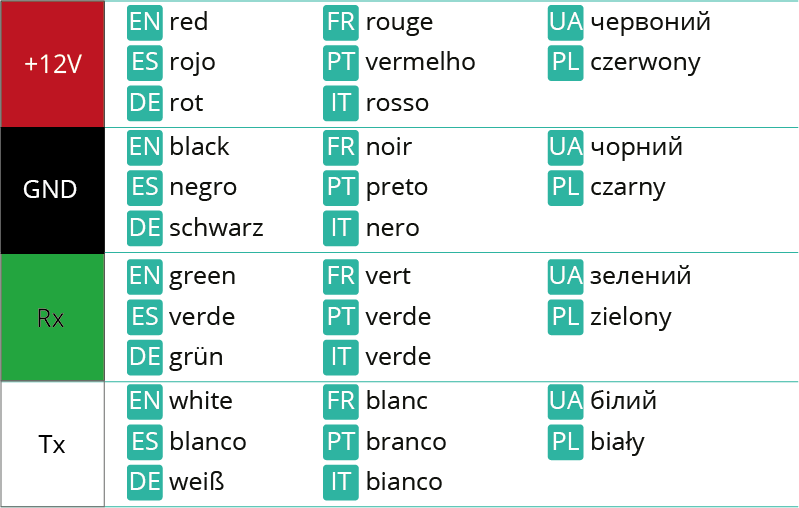
RS-232
The reader connection wires functions are listed in the table.
TouchMemory
The reader connection wires functions are listed in the table.
We recommended to use following whiring when reader connected to the control panel with twisted pair.
Configuration
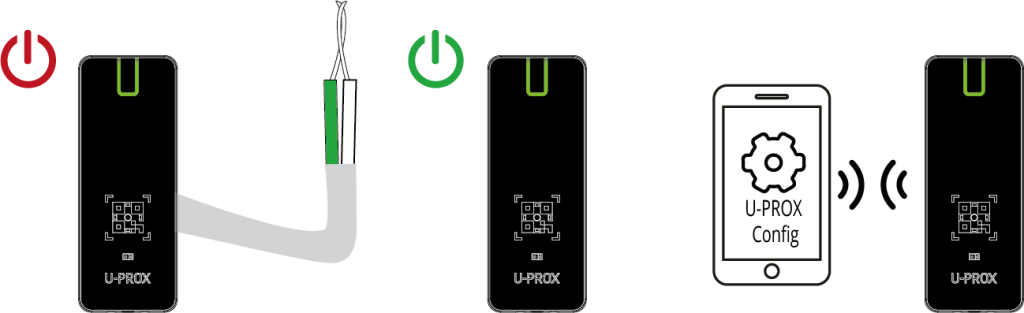
With the free mobile application U-PROX Config, the reader can be completely adjusted — from the indication to the encryption modes.

The reader is supplied without the engineering password for programming specified. To connect and (re) set the password — connect inputs D0 (green) and D1 (white) with each other and apply power to the reader.
Mobile identification
Reader supports digital personal mobile credential. It is processed and stored in the user’s smartphone using the U-PROX ID application. The mobile ID is transmitted from the smartphone to the reader via NFC and/or over the 2.4 GHz radio interface.
U-PROX ID mobile identifiers are provided for enrollment in the following forms:
- QR codes (image files) — subsequently sent to clients (via e-mail, messengers, etc.). The QR code is used to add the mobile identifier to the U-PROX ID application. The mobile ID is printed on the QR code and can also be manually added to the access control system (ACS).
- QR links — added to the U-PROX IP/WEB software using a dedicated file and are subsequently sent to clients from the access control system (ACS) via e-mail for enrollment in the application.
- License file for the U-PROX Desktop USB reader — used for local credential issuance.
QR codes used for activation of mobile identifier are single-use only. Re-activation is not possible.
After activation on the smartphone, mobile identifiers can be transmitted to U-PROX readers via the following channels:
- Bluetooth — supported on smartphones running Android and iOS platforms.
- NFC — supported on Android smartphones only (currently not available on iOS), when the corresponding option is enabled in the application.
Reader U-PROX SE QR slim supports hardware active mobile identifiers U-PROX Tag and U-PROX Auto Tag.
The reader supports three operating modes over the 2.4 GHz (BLE) radio interface for reading mobile credentials:
- “Door” mode — interaction range of up to 60 cm;
- “Proximity Door” mode — interaction range of 10–20 cm; the reader is activated by the proximity sensor.Recommended for bidirectional access points and turnstiles;
- “Gate / Barrier” mode — configurable via the U-PROX Config application from 1 to 15 m.
 |
|
 |

U-PROX ID application
Free mobile application U-PROX ID receives, stores and transmits mobile credentials between the reader and the smartphone.

How to obtain mobile ID
You can purchase mobile IDs from our dealers
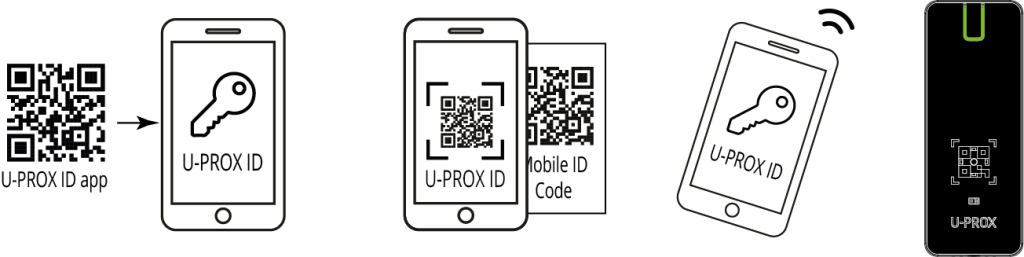
Attention!!! U-PROX Mobile ID QR codes are not intended to be scanned by a reader’s camera!
QR codes
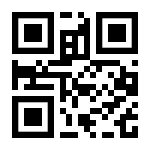
The reader supports 2D QR codes. For the proximity sensor to function correctly, the QR code must not exceed 2 × 2 cm in size; the recommended size is 1.5 × 1.5 cm.
The QR code must contain a text-based code consisting of hexadecimal digits (1234567890ABCDEF) that is 6 to 20 characters long (10 bytes).
Наприклад – код 12AB34BC56CD78DE90EF в вигляді QR:
Attention!!! These QR codes are not compatible with U-PROX Mobile ID QR codes!
Mifare® identifiers
The reader supports work with Mifare® cards, reads encrypted identifiers with a user-assigned card number, with a static or diversified encryption key.
Up to five encryption profiles can be used simultaneously.
Mifare®Classic
The least secure series of cards, has a Crypto 1 (SL1) encryption algorithm vulnerability.
When using it, it is recommended to encrypt all card sectors with a diversified encryption key.
Mifare®Plus
The reader supports SL1 and SL3 modes for Mifare®Plus. It is recommended to use SL3 mode as it has the highest security and AES encryption algorithm.
Mifare®Defire
The reader supports Mifare DESFire EV1, EV2 and EV3 cards. AES encryption algorithm is supported.
Warranty
The manufacturer guarantees that the U-PROX SE QR slim reader complies with the parameters described in this manual when properly stored and operated.
- Storage warranty period — 6 months from the date of manufacture
- Operational warranty period — 24 months from the date of commissioning
- Delivery, personnel training, installation, commissioning, and warranty service are carried out by the manufacturer or authorized organizations
- In case of a defect caused by the manufacturer, correction is performed within 10 days
- Warranty service is not provided in cases of:
- Incorrect connection,
- Failure to follow this manual,
- Mechanical damage,
- Natural disasters.
The manufacturer reserves the right to make design modifications that do not affect key specifications or reliability.
Training and Technical Support
Training courses covering installation and usage of the U-PROX SE QR slim reader are conducted by “Limited Liability Company Integrated Technical Vision.” For additional information, please contact the company’s staff at the phone numbers listed below.
Technical support:
https://t.me/u_prox_support_bot
This support is intended for trained specialists. End users should contact their dealers or installers before reaching out to “Limited Liability Company Integrated Technical Vision.”
Technical information is available at: www.u-prox.systems
Uploads
FAQ
-
Everything that is U-PROX, from the idea to the engineering implementation is done exclusively in Ukraine.
-
Areas of application have a wide range of ACS:
- company offices, business centers;
- banks;
- educational institutions (schools, technical schools, universities);
- industrial enterprises;
- protected areas;
- parking lots;
- places of passage of vehicles;
- private houses;
- residential complexes;
- cottages;
- hotels;
- public institutions (sports complexes, museums, metro, etc.)
-
You can buy U-Prox equipment from our partners.
-
A reader is a device that reads the code (key) of the identifier and transmits it to the controller.
-
U-PROX WEB provides a full range of solutions for quick installation, configuration and daily use of IP ACS by enterprises of any size, from a small office to a large company with many branches.
U-PROX Web has a full-featured web interface with fine-tuning of all ACS capabilities and provides the ability to monitor events, configure equipment, manage personnel access, and generate reports.
-
Open formats JSON and SOAP (XML) allow interaction between different applications, exchange data with access control systems and create applications that complement and extend the standard functionality of the U-PROX Web system.
API capabilities:
- Secure data exchange over a computer network.
- WEB service – the opportunity to interact with any platform and programming environment for SOAP and JSON protocols.
- Implementation of the user interface using the API.
- The ability to integrate with other systems and applications implemented by third-party developers.
-
An identifier is the basic element of an access control system that stores a code.
Each client is assigned a specific key (code), which serves to determine the owner’s rights – identification.
A card, a key fob, a tag can perform the function of an identifier.
-
The control panes is the “brain” of the system, which determines whether or not the owner of the identifier is allowed to enter the door.
It has a built-in memory that stores identifier codes with a list of access rights for each of them.
When a person presents (brings to the reader) an identifier, the code read from it is compared with the one stored in the database, on the basis of which a decision is made to open the door.
-
PACS — Physical Access Control System —an access control and management system is a set of hardware and software control and management tools.
The main goal is to restrict and register the entry-exit of objects in a given area through “points of passage”: doors, gates, etc.
The main task is to control access to a given territory (who to let in, at what time and to what territory), including also:
- restricting access to a given territory;
- identification of a person who has access to a given territory.
-
- Connect wires D0 (green) and D1 (white) with each other
- Apply power to the reader
- Connect to the reader with application U-Prox Config installed on smartphone.
- Select “Settings”
- Set a password
- Go back
- Press “Save Settings”
- Press “Disconnect”